UVM has a rich reporting facility. This article explains how to use a verbosity threshold to filter messages.
Pre-defined Verbosity Levels
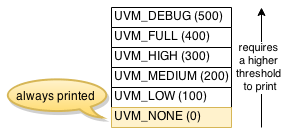
UVM pre-defines six verbosity levels; UVM_NONE to UVM_DEBUG. These levels are nothing but integer enum values (the parentheses in the figure show the values). A message with the UVM_NONE level is always printed, while a message with another verbosity level requires a higher threshold to print.
Verbosity-Level Example
As an example, I added several `uvm_info macros with different verbosity levels to the functional coverage subscriber and the scoreboard. The macro takes three arguments; `uvm_info( ID, MESSAGE, VERBOSITY_LEVEL )
Functional Coverage Subscriber
1 2 3 4 5 6 7 8 9 10 11 12 13 14 15 16 17 18 19 20 21 22 | class jelly_bean_fc_subscriber extends uvm_subscriber#( jelly_bean_transaction ); // ... function void write( jelly_bean_transaction t ); jb_tx = t; jelly_bean_cg.sample(); // _ID__ _________________________MESSAGE__________________________ VERBOSITY_LEVEL `uvm_info( "id1", { t.color.name(), " ", t.flavor.name(), " 1 UVM_DEBUG" }, UVM_DEBUG ) `uvm_info( "id1", { t.color.name(), " ", t.flavor.name(), " 2 UVM_FULL" }, UVM_FULL ) `uvm_info( "id1", { t.color.name(), " ", t.flavor.name(), " 3 UVM_HIGH" }, UVM_HIGH ) `uvm_info( "id1", { t.color.name(), " ", t.flavor.name(), " 4 UVM_MEDIUM" }, UVM_MEDIUM ) `uvm_info( "id1", { t.color.name(), " ", t.flavor.name(), " 5 UVM_LOW" }, UVM_LOW ) `uvm_info( "id1", { t.color.name(), " ", t.flavor.name(), " 6 UVM_NONE" }, UVM_NONE ) `uvm_info( "id2", { t.color.name(), " ", t.flavor.name(), " 7 UVM_DEBUG" }, UVM_DEBUG ) `uvm_info( "id2", { t.color.name(), " ", t.flavor.name(), " 8 UVM_FULL" }, UVM_FULL ) `uvm_info( "id2", { t.color.name(), " ", t.flavor.name(), " 9 UVM_HIGH" }, UVM_HIGH ) `uvm_info( "id2", { t.color.name(), " ", t.flavor.name(), " 10 UVM_MEDIUM" }, UVM_MEDIUM ) `uvm_info( "id2", { t.color.name(), " ", t.flavor.name(), " 11 UVM_LOW" }, UVM_LOW ) `uvm_info( "id2", { t.color.name(), " ", t.flavor.name(), " 12 UVM_NONE" }, UVM_NONE ) endfunction: write endclass: jelly_bean_fc_subscriber |
Scoreboard
1 2 3 4 5 6 7 8 9 10 11 12 13 14 15 16 17 18 19 20 21 22 23 24 | class jelly_bean_sb_subscriber extends uvm_subscriber#( jelly_bean_transaction ); // ... function void write( jelly_bean_transaction t ); if ( t.flavor == CHOCOLATE && t.sour && t.taste == YUMMY || ! ( t.flavor == CHOCOLATE && t.sour ) && t.taste == YUCKY ) begin `uvm_error( get_name(), { "You lost sense of taste!", t.convert2string() } ) end else begin // _ID__ _________________________MESSAGE__________________________ VERBOSITY_LEVEL `uvm_info( "id1", { t.color.name(), " ", t.flavor.name(), " 13 UVM_DEBUG" }, UVM_DEBUG ) `uvm_info( "id1", { t.color.name(), " ", t.flavor.name(), " 14 UVM_FULL" }, UVM_FULL ) `uvm_info( "id1", { t.color.name(), " ", t.flavor.name(), " 15 UVM_HIGH" }, UVM_HIGH ) `uvm_info( "id1", { t.color.name(), " ", t.flavor.name(), " 16 UVM_MEDIUM" }, UVM_MEDIUM ) `uvm_info( "id1", { t.color.name(), " ", t.flavor.name(), " 17 UVM_LOW" }, UVM_LOW ) `uvm_info( "id1", { t.color.name(), " ", t.flavor.name(), " 18 UVM_NONE" }, UVM_NONE ) `uvm_info( "id2", { t.color.name(), " ", t.flavor.name(), " 19 UVM_DEBUG" }, UVM_DEBUG ) `uvm_info( "id2", { t.color.name(), " ", t.flavor.name(), " 20 UVM_FULL" }, UVM_FULL ) `uvm_info( "id2", { t.color.name(), " ", t.flavor.name(), " 21 UVM_HIGH" }, UVM_HIGH ) `uvm_info( "id2", { t.color.name(), " ", t.flavor.name(), " 22 UVM_MEDIUM" }, UVM_MEDIUM ) `uvm_info( "id2", { t.color.name(), " ", t.flavor.name(), " 23 UVM_LOW" }, UVM_LOW ) `uvm_info( "id2", { t.color.name(), " ", t.flavor.name(), " 24 UVM_NONE" }, UVM_NONE ) end endfunction: write endclass: jelly_bean_sb_subscriber |
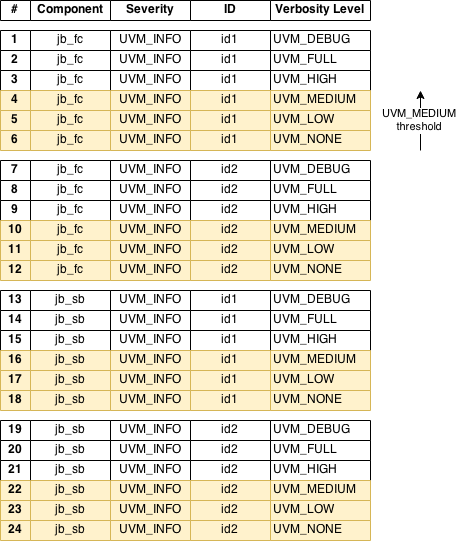
The following figure summarizes the messages defined in the above two components.

Default Verbosity Threshold
If we do not specify any verbosity threshold, UVM uses UVM_MEDIUM as the default. This means all the messages with UVM_NONE, UVM_LOW, and UVM_MEDIUM will be printed, but the messages with UVM_HIGH, UVM_FULL, and UVM_DEBUG won’t.
# KERNEL: UVM_INFO /home/runner/env.svh(43) @ 25: uvm_test_top.jb_env.jb_fc [id1] GREEN BUBBLE_GUM 4 UVM_MEDIUM # KERNEL: UVM_INFO /home/runner/env.svh(44) @ 25: uvm_test_top.jb_env.jb_fc [id1] GREEN BUBBLE_GUM 5 UVM_LOW # KERNEL: UVM_INFO /home/runner/env.svh(45) @ 25: uvm_test_top.jb_env.jb_fc [id1] GREEN BUBBLE_GUM 6 UVM_NONE # KERNEL: UVM_INFO /home/runner/env.svh(50) @ 25: uvm_test_top.jb_env.jb_fc [id2] GREEN BUBBLE_GUM 10 UVM_MEDIUM # KERNEL: UVM_INFO /home/runner/env.svh(51) @ 25: uvm_test_top.jb_env.jb_fc [id2] GREEN BUBBLE_GUM 11 UVM_LOW # KERNEL: UVM_INFO /home/runner/env.svh(52) @ 25: uvm_test_top.jb_env.jb_fc [id2] GREEN BUBBLE_GUM 12 UVM_NONE # KERNEL: UVM_INFO /home/runner/env.svh(85) @ 25: uvm_test_top.jb_env.jb_sb [id1] GREEN BUBBLE_GUM 16 UVM_MEDIUM # KERNEL: UVM_INFO /home/runner/env.svh(86) @ 25: uvm_test_top.jb_env.jb_sb [id1] GREEN BUBBLE_GUM 17 UVM_LOW # KERNEL: UVM_INFO /home/runner/env.svh(87) @ 25: uvm_test_top.jb_env.jb_sb [id1] GREEN BUBBLE_GUM 18 UVM_NONE # KERNEL: UVM_INFO /home/runner/env.svh(92) @ 25: uvm_test_top.jb_env.jb_sb [id2] GREEN BUBBLE_GUM 22 UVM_MEDIUM # KERNEL: UVM_INFO /home/runner/env.svh(93) @ 25: uvm_test_top.jb_env.jb_sb [id2] GREEN BUBBLE_GUM 23 UVM_LOW # KERNEL: UVM_INFO /home/runner/env.svh(94) @ 25: uvm_test_top.jb_env.jb_sb [id2] GREEN BUBBLE_GUM 24 UVM_NONE |
Setting Global Verbosity Threshold
+UVM_VERBOSITY
Let’s change the verbosity threshold. If you just want to change the threshold globally, the easiest way is to use the +UVM_VERBOSITY command-line argument. For example, you can set the threshold as UVM_LOW as follows.
+UVM_VERBOSITY=UVM_LOW |

When you run a simulation, you will get the messages like this:
# KERNEL: UVM_INFO /home/runner/env.svh(44) @ 25: uvm_test_top.jb_env.jb_fc [id1] GREEN BUBBLE_GUM 5 UVM_LOW # KERNEL: UVM_INFO /home/runner/env.svh(45) @ 25: uvm_test_top.jb_env.jb_fc [id1] GREEN BUBBLE_GUM 6 UVM_NONE # KERNEL: UVM_INFO /home/runner/env.svh(51) @ 25: uvm_test_top.jb_env.jb_fc [id2] GREEN BUBBLE_GUM 11 UVM_LOW # KERNEL: UVM_INFO /home/runner/env.svh(52) @ 25: uvm_test_top.jb_env.jb_fc [id2] GREEN BUBBLE_GUM 12 UVM_NONE # KERNEL: UVM_INFO /home/runner/env.svh(86) @ 25: uvm_test_top.jb_env.jb_sb [id1] GREEN BUBBLE_GUM 17 UVM_LOW # KERNEL: UVM_INFO /home/runner/env.svh(87) @ 25: uvm_test_top.jb_env.jb_sb [id1] GREEN BUBBLE_GUM 18 UVM_NONE # KERNEL: UVM_INFO /home/runner/env.svh(93) @ 25: uvm_test_top.jb_env.jb_sb [id2] GREEN BUBBLE_GUM 23 UVM_LOW # KERNEL: UVM_INFO /home/runner/env.svh(94) @ 25: uvm_test_top.jb_env.jb_sb [id2] GREEN BUBBLE_GUM 24 UVM_NONE |
Since the threshold became lower, you no longer see the messages with UVM_MEDIUM.
Setting Component-specific Verbosity Threshold
set_report_verbosity_level
If you want to set the verbosity threshold to a specific component, you can do it using the set_report_verbosity_level function, which is defined in the uvm_report_object class. For example, you can set the UVM_MEDIUM threshold to the scoreboard as follows (line 5):
1 2 3 4 5 6 7 | class jelly_bean_test extends uvm_test; // ... task main_phase( uvm_phase phase ); // ... jb_env.jb_sb.set_report_verbosity_level( UVM_MEDIUM ); endtask: main_phase endclass: jelly_bean_test |
Note that in our example, we still set the global UVM_LOW threshold as we did in the previous section. Component-specific threshold takes precedence over the global threshold.

When you run a simulation, you will get the messages like this:
# KERNEL: UVM_INFO /home/runner/env.svh(44) @ 25: uvm_test_top.jb_env.jb_fc [id1] GREEN BUBBLE_GUM 5 UVM_LOW # KERNEL: UVM_INFO /home/runner/env.svh(45) @ 25: uvm_test_top.jb_env.jb_fc [id1] GREEN BUBBLE_GUM 6 UVM_NONE # KERNEL: UVM_INFO /home/runner/env.svh(51) @ 25: uvm_test_top.jb_env.jb_fc [id2] GREEN BUBBLE_GUM 11 UVM_LOW # KERNEL: UVM_INFO /home/runner/env.svh(52) @ 25: uvm_test_top.jb_env.jb_fc [id2] GREEN BUBBLE_GUM 12 UVM_NONE # KERNEL: UVM_INFO /home/runner/env.svh(85) @ 25: uvm_test_top.jb_env.jb_sb [id1] GREEN BUBBLE_GUM 16 UVM_MEDIUM# KERNEL: UVM_INFO /home/runner/env.svh(86) @ 25: uvm_test_top.jb_env.jb_sb [id1] GREEN BUBBLE_GUM 17 UVM_LOW# KERNEL: UVM_INFO /home/runner/env.svh(87) @ 25: uvm_test_top.jb_env.jb_sb [id1] GREEN BUBBLE_GUM 18 UVM_NONE# KERNEL: UVM_INFO /home/runner/env.svh(92) @ 25: uvm_test_top.jb_env.jb_sb [id2] GREEN BUBBLE_GUM 22 UVM_MEDIUM# KERNEL: UVM_INFO /home/runner/env.svh(93) @ 25: uvm_test_top.jb_env.jb_sb [id2] GREEN BUBBLE_GUM 23 UVM_LOW# KERNEL: UVM_INFO /home/runner/env.svh(94) @ 25: uvm_test_top.jb_env.jb_sb [id2] GREEN BUBBLE_GUM 24 UVM_NONE |
The threshold of the scoreboard became UVM_MEDIUM, while the threshold of the functional coverage subscriber remains UVM_LOW.
set_report_verbosity_level_hier
If you want to set the threshold to a component and all its children, you can use the set_report_verbosity_level_hier function, which is defined in the uvm_component class. For example, you can set the UVM_LOW threshold to all the components in the test-bench as follows (line 3). This is actually equivalent to setting +UVM_VERBOSITY=UVM_LOW.
1 2 3 4 | module top; // ... initial uvm_top.set_report_verbosity_level_hier( UVM_LOW );endmodule: top |
Setting ID-specific Verbosity Threshold
set_report_id_verbosity / set_report_id_verbosity_hier
If you really want to set the verbosity threshold to a specific message ID, you can do it using the set_report_id_verbosity function, which is defined in the uvm_report_object class (or the set_report_id_verbosity_hier function defined in the uvm_component class if you want to set the threshold recursively). For example, you can set the UVM_HIGH threshold to the messages whose ID is "id1" as follows (line 5):
1 2 3 4 5 6 7 | class jelly_bean_test extends uvm_test; // ... task main_phase( uvm_phase phase ); // ... jb_env.jb_sb.set_report_id_verbosity( "id1", UVM_HIGH ); endtask: main_phase endclass: jelly_bean_test |
Note that in our example, we still set the global threshold and component-specific threshold as we did in the previous sections. ID-specific threshold takes precedence over the component-specific threshold (and the global threshold).

When you run a simulation, you will get the messages like this:
# KERNEL: UVM_INFO /home/runner/env.svh(44) @ 25: uvm_test_top.jb_env.jb_fc [id1] GREEN BUBBLE_GUM 5 UVM_LOW # KERNEL: UVM_INFO /home/runner/env.svh(45) @ 25: uvm_test_top.jb_env.jb_fc [id1] GREEN BUBBLE_GUM 6 UVM_NONE # KERNEL: UVM_INFO /home/runner/env.svh(51) @ 25: uvm_test_top.jb_env.jb_fc [id2] GREEN BUBBLE_GUM 11 UVM_LOW # KERNEL: UVM_INFO /home/runner/env.svh(52) @ 25: uvm_test_top.jb_env.jb_fc [id2] GREEN BUBBLE_GUM 12 UVM_NONE # KERNEL: UVM_INFO /home/runner/env.svh(84) @ 25: uvm_test_top.jb_env.jb_sb [id1] GREEN BUBBLE_GUM 15 UVM_HIGH# KERNEL: UVM_INFO /home/runner/env.svh(85) @ 25: uvm_test_top.jb_env.jb_sb [id1] GREEN BUBBLE_GUM 16 UVM_MEDIUM# KERNEL: UVM_INFO /home/runner/env.svh(86) @ 25: uvm_test_top.jb_env.jb_sb [id1] GREEN BUBBLE_GUM 17 UVM_LOW# KERNEL: UVM_INFO /home/runner/env.svh(87) @ 25: uvm_test_top.jb_env.jb_sb [id1] GREEN BUBBLE_GUM 18 UVM_NONE# KERNEL: UVM_INFO /home/runner/env.svh(92) @ 25: uvm_test_top.jb_env.jb_sb [id2] GREEN BUBBLE_GUM 22 UVM_MEDIUM # KERNEL: UVM_INFO /home/runner/env.svh(93) @ 25: uvm_test_top.jb_env.jb_sb [id2] GREEN BUBBLE_GUM 23 UVM_LOW # KERNEL: UVM_INFO /home/runner/env.svh(94) @ 25: uvm_test_top.jb_env.jb_sb [id2] GREEN BUBBLE_GUM 24 UVM_NONE |
Because we called the set_report_id_verbosity function to the scoreboard only, the threshold of the functional coverage subscriber remains UVM_LOW even though some messages have the same ID ("id1").
Setting Severity-and-ID-specific Verbosity Threshold
set_report_severity_id_verbosity / set_report_severity_id_verbosity_hier
Although we covered only UVM_INFO severity in this article, you can set the verbosity threshold to a specific severity and message ID using the set_report_severity_id_verbosity function, which is defined in the uvm_report_object class (or the set_report_severity_id_verbosity_hier function defined in the uvm_component class if you want to set the threshold recursively). For example, you can set the UVM_FULL threshold to the messages whose ID is "id2" as follows (line 5):
1 2 3 4 5 6 7 | class jelly_bean_test extends uvm_test; // ... task main_phase( uvm_phase phase ); // ... jb_env.jb_fc.set_report_severity_id_verbosity( UVM_INFO, "id2", UVM_FULL ); endtask: main_phase endclass: jelly_bean_test |
Note that in our example, we still set the global threshold and component and ID-specific thresholds as we did in the previous sections. Severity-and-ID-specific threshold takes the highest precedence.

When you run a simulation, you will get the messages like this:
# KERNEL: UVM_INFO /home/runner/env.svh(44) @ 25: uvm_test_top.jb_env.jb_fc [id1] RED APPLE 5 UVM_LOW # KERNEL: UVM_INFO /home/runner/env.svh(45) @ 25: uvm_test_top.jb_env.jb_fc [id1] RED APPLE 6 UVM_NONE # KERNEL: UVM_INFO /home/runner/env.svh(48) @ 25: uvm_test_top.jb_env.jb_fc [id2] RED APPLE 8 UVM_FULL# KERNEL: UVM_INFO /home/runner/env.svh(49) @ 25: uvm_test_top.jb_env.jb_fc [id2] RED APPLE 9 UVM_HIGH# KERNEL: UVM_INFO /home/runner/env.svh(50) @ 25: uvm_test_top.jb_env.jb_fc [id2] RED APPLE 10 UVM_MEDIUM# KERNEL: UVM_INFO /home/runner/env.svh(51) @ 25: uvm_test_top.jb_env.jb_fc [id2] RED APPLE 11 UVM_LOW# KERNEL: UVM_INFO /home/runner/env.svh(52) @ 25: uvm_test_top.jb_env.jb_fc [id2] RED APPLE 12 UVM_NONE# KERNEL: UVM_INFO /home/runner/env.svh(84) @ 25: uvm_test_top.jb_env.jb_sb [id1] RED APPLE 15 UVM_HIGH # KERNEL: UVM_INFO /home/runner/env.svh(85) @ 25: uvm_test_top.jb_env.jb_sb [id1] RED APPLE 16 UVM_MEDIUM # KERNEL: UVM_INFO /home/runner/env.svh(86) @ 25: uvm_test_top.jb_env.jb_sb [id1] RED APPLE 17 UVM_LOW # KERNEL: UVM_INFO /home/runner/env.svh(87) @ 25: uvm_test_top.jb_env.jb_sb [id1] RED APPLE 18 UVM_NONE # KERNEL: UVM_INFO /home/runner/env.svh(92) @ 25: uvm_test_top.jb_env.jb_sb [id2] RED APPLE 22 UVM_MEDIUM # KERNEL: UVM_INFO /home/runner/env.svh(93) @ 25: uvm_test_top.jb_env.jb_sb [id2] RED APPLE 23 UVM_LOW # KERNEL: UVM_INFO /home/runner/env.svh(94) @ 25: uvm_test_top.jb_env.jb_sb [id2] RED APPLE 24 UVM_NONE |
Final Notes
As you might be aware that the threshold-setting functions are defined in the uvm_report_object and uvm_component classes. This means you cannot call the function to a sequence or a non-component object, because they are not derived from these classes.
jelly_bean_sequence .set_report_verbosity_level( UVM_HIGH ); // You cannot do this. jelly_bean_transaction.set_report_verbosity_level( UVM_HIGH ); // This won't work either. |
Instead, the message in a sequence uses the verbosity threshold of the sequencer the sequence is running on. If the sequence is a virtual sequence (the sequencer is null), then the verbosity threshold of the uvm_top is used. The message in another non-component object or in a module also uses the threshold of the uvm_top.

As always, you can view and run the code on EDA Playground.
I think set_report_severity_id_verbosity(…) and its brother are remnants of a time long gone. uvm_report_error(…) does still take a verbosity parameter, but `uvm_error does not. The developers realized that it’s silly to mask out error messages using the verbosity parameter. Hopefully in a future release the whole mess will be cleaned up completely.
I tried these one in my project in “start_of_simulation” phase instead of the “main_phase” and it’s not working….. Any idea why ???
I tried to set the verbosity in the
start_of_simulation_phaseusing this EDA Playground and it worked fine. Something might be wrong in your environment.Hi , Can the set_report_id_verbosity_hier,set_report_severity_id_verbosity_hier be used from command line to alter the verbosity of a specific id. I’m trying to change the verbosity of a specific id inside my UVM ENV to UVM_LOW instead of (UVM_HIGH which is the default for this id) to provide additional debug . I tried this using +uvm_set_verbosity=uvm_test_top.env0.*,ram_cb_debug,UVM_LOW’. But getting reported that this setting is ignored.
1. Is the PHASE argument mandatory to the +uvm_set_verbosity_call ?
2. Typical examples of +uvm_set_verboisty seen are to reduce the verbosity(say default is UVM_LOW changing it to UVM_HIGH), does this work for setting other way around
1. The
+uvm_set_verbositytakes 4 or 5 arguments. You either specify the phase or the time to alter the verbosity. For example, the followings show the equivalent command-line arguments to the API calls I used in my blog.The first command-line arguments above use the
run_phaseto alter the verbosity. Note that you need to omit the_phasefrom the name of the phase (usemaininstead ofmain_phase, etc.). Also note that the_ALL_means all IDs.The second command-line arguments specify the time to alter the verbosity. It changes the verbosity at time zero.
Let’s see more examples.
2. You can change to any verbosity (low to high, or high to low).
How do I control the verbosity of certain components so that I can set a verbosity to only few of the components?
Lets say, for example in the verification of a particular feature, the test, few set of components/sequences/objects/interfaces etc are involved. I would like to set the verbosity of only these to be UVM_HIGH. I do not want to set the global severity to be set UVM_HIGH since lot of unrelated debug messages could come in which might increase the log size.
What would be a cleaner way of doing this? Its okay to use an additional commandline-plusarg for triggering this. Basically, the requirement would be that the test/components/sequences/objects/interfaces involved for a particular feature verification should take the global severity or the feature specific severity depending on which is higher.
Please note that one cannot use the built in report methods of uvm_component since, the uvm_info statements can be inside uvm_object extended classes as well as interfaces.
Sorry for the very slow reply. I would use
+uvm_set_verbosity=comp,id,verbosity,phasecommand-line argument.uvm_component
For a
uvm_componentlike this,I would specify:
// +uvm_set_verbosity=uvm_test_top.jb_env.jb_agent.jb_drvr,_ALL_,UVM_HIGH,mainwhere
uvm_test_top.jb_env.jb_agent.jb_drvris the component hierarchy,_ALL_means all IDs, andmainmeans themain_phase.uvm_sequence
For a
uvm_sequencelike this,I would specify:
// +uvm_set_verbosity=uvm_test_top.jb_env.jb_agent.jb_seqr,gift_boxed_jelly_bean_sequence,UVM_HIGH,mainwhere
uvm_test_top.jb_env.jb_agent.jb_seqris the sequencer the sequence is running on, andgift_boxed_jelly_bean_sequenceis the message ID.uvm_object
For a
uvm_objectlike this,I would specify:
// +uvm_set_verbosity=*,jelly_bean_transaction,UVM_HIGH,mainwhere
*is a wildcard.interface
For an interface like this,
I would specify:
// +uvm_set_verbosity=*,jelly_bean_if,UVM_HIGH,mainwhere
*is a wildcard again.You can specify as many
+uvm_set_verbosityas you need.